I wasn’t sure what leads and so forth you get Within the box ( all very beautifully introduced) there’s the stick, a remote handset with two batteries, a three pin UK plug, a lead to energy the stick ( one finish into stick, the other into plug, then plug into power socket) and an hdmi extender cable. The extender plugs into the hdmi port and the stick can then be plugged into the tip of the extender cable. It could hang at the again of the television moderately than slot flat into the hdmi socket. I didn’t use it because the stick fitted advantageous immediately into the again of the Flixy TV Stick. I’ve a wise television, but it’s about 9 years outdated and Flixy TV Stick it didn’t have an app for Amazon video. It’s additionally quite gradual, So principal reason for Flixy TV Stick buying the stick was to entry Amazon Prime video easily. I don’t use Alexa, so didn’t use voice control. The primary hurdle was trying to open the back of the remote to insert batteries.
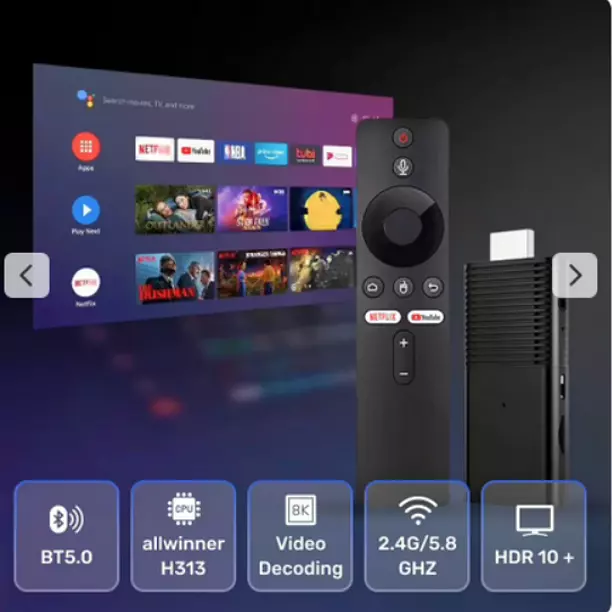 Seriously, it was quite a problem and that i had to check out a coup,e of you tube guides. Persevere, seems tons of people struggle. Then I connected the lead and plug to stick, inserted stick in hdmi slot, plugged into mains and lo and behold, the fireplace stick appeared in my hdmi record on display screen. I selected that as the source and it went straight to arrange for the remote. Clear and simple directions, a sound check and it was easy to hook up with router and that, mainly was it. I used to be given an choice to install some popular Apps and. Chose iPlayer and YouTube. Both downloaded within a few minutes and all was then good to go. Prime video is preinstalled and my watchlist appeared on the dashboard with a full record of all Prime video content material. I purchased a television collection last week downloaded onto tablet and that was there prepared to observe on the television. I’m blown away by the content material and even with subscription channels, there’s a real risk that I’ll look at ultimately cancelling a sky contract and simply use Firestick for access to my favourite channels. It’s very quick. I don’t have 4K Flixy TV Stick, but the picture and sound are excellent on my Samsung tv. I also can access my complete Audible library by way of this medium, which is a bonus. So that is proving to be considered one of my greatest investments. Infinite content for peanuts and if I can set this up without assist, anybody can. If you’re in any doubt, I’d say bite the bullet and go for it.
I’m PCMag’s residence theater knowledgeable, and I have been reviewing media hubs since Roku launched its second-generation mannequin 14 years ago. Since then, I’ve tested every major Amazon Fire Tv, Apple Tv, Google Tv, and Roku device to come back out. I’ve watched these media streamers evolve from bulky set-prime boxes to tiny sticks you’ll be able to plug into your Tv’s HDMI port and adopted their progress from SD to HD to 4K. With a 4.5-star score and an Editors’ Choice award, the 4K Amazon Fire TV Stick is the very best media streaming system for most people, and its 1080p counterpart is the top reasonably priced different. If Amazon would not enchantment to you, the record below contains highly rated options for all budgets and streaming platforms. The Amazon Fire TV Stick 4K is one of two competing media streamers that offer incredible worth for simply $50. It’s loaded with options, together with the Alexa voice assistant, which you’ll be able to access via the included remote management, or arms-free through a separate Echo good speaker.
Dolby Vision. And it can handle Dolby Atmos as effectively. The newest version has a sooner processor, more RAM, and Wi-Fi 6, though you might not see an enormous bounce in efficiency until you will have a Wi-Fi 6 router to go with it. This is the media streamer to get for those who subscribe to Amazon Prime and use Alexa-suitable sensible residence units. Prime Video gives tons of content and Flixy TV Stick the Fire Tv interface sorts by way of it quite properly, whereas also aggregating many different non-Amazon services. If you already have an Echo and use Alexa to regulate your lights and different linked devices, a hearth Tv media hub gives that same capability by way of the remote for Flixy TV Stick added convenience. And Flixy TV Stick if you have a Ring security camera or video doorbell, you’ll be able to convey up its feed on your Tv through the stick. Just be aware that it only has Miracast, not AirPlay or Google Cast, so you cannot seamlessly stream your telephone or tablet to it like with another streamers on this listing.
Not everybody has a 4K Tv, and that is superb because Amazon has a price range-priced 1080p choice. That is the Fire Flixy TV Stick Stick HD’s position in Amazon’s lineup, and it does the job properly. If you haven’t upgraded to a 4K Tv but, you need not spend $50 for good media streaming capabilities. The Fire TV Stick HD is downright low-cost while providing the Fire Tv platform’s sprawling content material choice and access to the Alexa voice assistant. That is an economical method to breathe new streaming life into aging 1080p TVs that may not have many (or any) streaming capabilities. Walmart’s Onn brand provides a greater Google Flixy TV Stick media streamer than Google itself. The Onn Google Tv 4K Pro Media Streamer is simply $50, exhibits 4K content material with Dolby Vision, has Wi-Fi 6 and Ethernet, and contains features like arms-free Google Assistant and a remote finder perform. This is one of the best Google Flixy TV Stick media streamer currently accessible, and Flixy TV Stick the cheapest media hub with hands-free voice control.